A disconnected environment is an environment that does not have full access to the internet.
OpenShift Container Platform is designed to perform many automatic functions that depend on an internet connection, such as retrieving release images from a registry or retrieving update paths and recommendations for the cluster. Without a direct internet connection, you must perform additional setup and configuration for your cluster to maintain full functionality in the disconnected environment.
You can use a mirror registry for disconnected installations and to ensure that your clusters only use container images that satisfy your organization’s controls on external content. Before you install a cluster on infrastructure that you provision in a disconnected environment, you must mirror the required container images into that environment. To mirror container images, you must have a registry for mirroring.
Connected Mirroring is if you have a host that can access both the internet and your mirror registry, but not your cluster nodes, you can directly mirror the content from that machine.
Disconnected Mirroring is if you have no such host, you must mirror the images to a file system and then bring that host or removable media into your restricted environment.
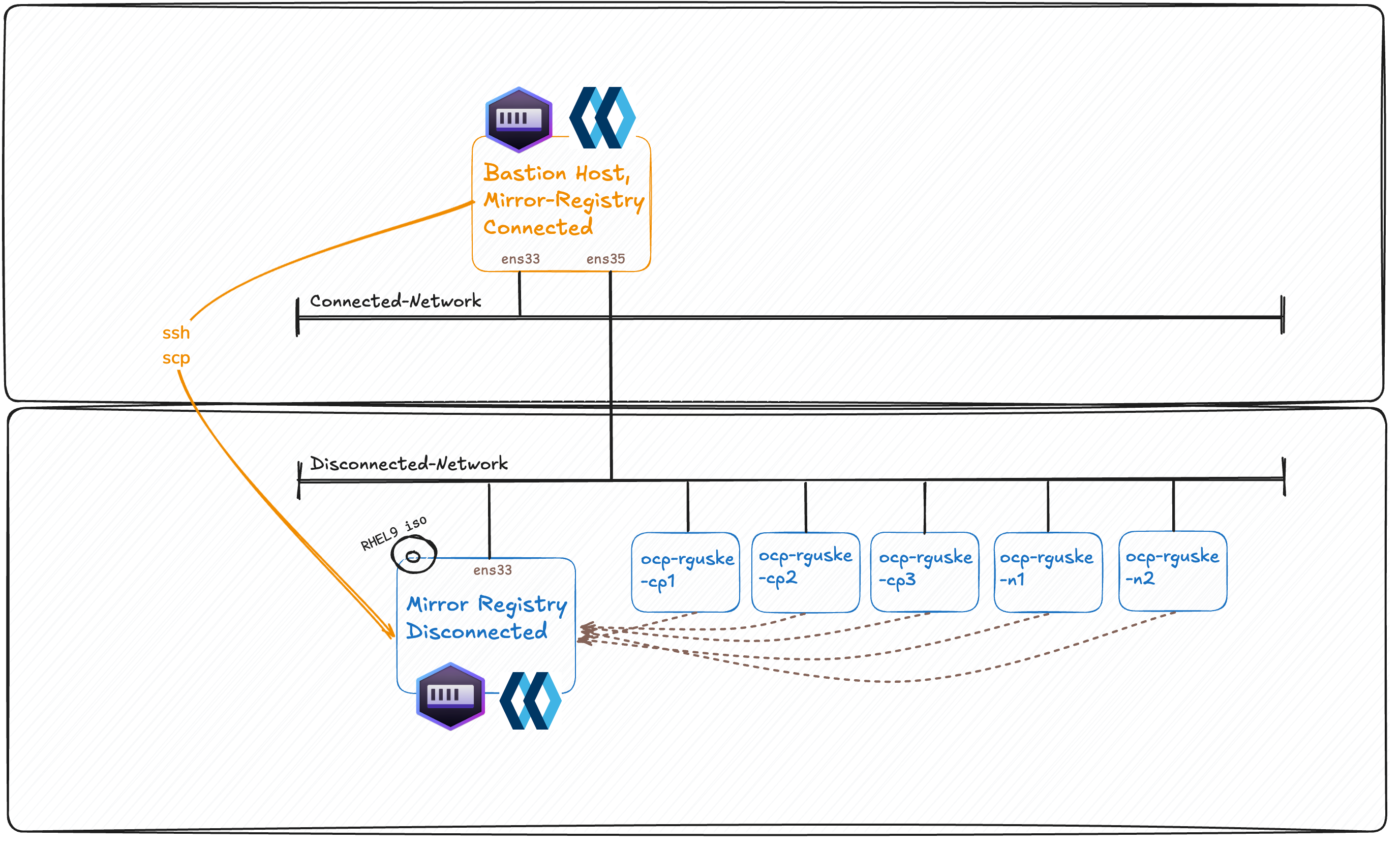
At a high-level, the testing setup has a bastion host which is dual-homed configured. One NIC is connected to the "public" network and the other NIC to the "disconnected" network. Most customer setups don't have a bastion connected to the public (internet) network. Anyways! We're going to "download" the images and storing all in a tar ball. This tar ball will be copied over to the mirror-registry host.
nmcli con show

NAME                UUID                                  TYPE      DEVICE
System eth0         5fb06bd0-0bb0-7ffb-45f1-d6edd65f3e03  ethernet  eth0
lo                  dd314177-6d3f-4ad3-a1af-2875d094c193  loopback  lo
Wired connection 1  c8d40ef7-3d02-3ba5-b047-dacd6d013b24  ethernet  --
nmcli con up "System eth0" && nmcli con up "Wired connection 1"

Connection successfully activated (D-Bus active path: /org/freedesktop/NetworkManager/ActiveConnection/25)
Connection successfully activated (D-Bus active path: /org/freedesktop/NetworkManager/ActiveConnection/26)
ip -br a
lo               UNKNOWN        127.0.0.1/8 ::1/128
eth0             UP             10.32.96.145/20 2620:52:0:2060:d8:6dff:fe0f:3ed3/64 fe80::d8:6dff:fe0f:3ed3/64
eth1             UP             192.168.69.208/24 fe80::a0eb:9896:d4e1:3fbb/64
nmcli -f NAME,UUID,FILENAME con show
NAME                UUID                                  FILENAME
System eth0         5fb06bd0-0bb0-7ffb-45f1-d6edd65f3e03  /etc/sysconfig/network-scripts/ifcfg-eth0
Wired connection 1  c8d40ef7-3d02-3ba5-b047-dacd6d013b24  /etc/NetworkManager/system-connections/Wired connection 1.nmconnection
lo                  dd314177-6d3f-4ad3-a1af-2875d094c193  /run/NetworkManager/system-connections/lo.nmconnection
Generating an SSH key pair on your Bastion-Host. You can use this key pair to authenticate into the OpenShift Container Platform cluster’s nodes after it is deployed.
The "mirror" plugin for the OpenShift CLI client (oc) controls the process of mirroring all relevant container image for a full disconnected OpenShift installation in a central, declarative tool. Learn more(new window or tab)
RHEL 9 is FIPS compatible; RHEL 8 is non-FIPS compatible.
Unpack the .gz files, except execution-environment.tar, image-archive.tar and sqlite3.tar of the folder mirror-registry and move them into /usr/local/bin:
Red Hat Enterprise Linux (RHEL) 8 and 9 with Podman 3.4.2 or later and OpenSSL installed. If you are using Podman 5.7 or later, see "Configuring rootless Podman networking".
Fully qualified domain name for the Red Hat Quay service, which must resolve through a DNS server.
Key-based SSH connectivity on the target host. SSH keys are automatically generated for local installs. For remote hosts, you must generate your own SSH keys.
2 or more vCPUs.
8 GB of RAM.
About 12 GB for OpenShift Container Platform 4.21 release images, or about 358 GB for OpenShift Container Platform 4.21 release images and OpenShift Container Platform 4.21 Red Hat Operator images.
You can use any container registry that supports Docker v2-2, such as Red Hat Quay, the mirror registry for Red Hat OpenShift, Artifactory, Sonatype Nexus Repository, or Harbor.
The OpenShift image registry cannot be used as the target registry because it does not support pushing without a tag, which is required during the mirroring process.
Install the mirror registry:
At this point it is important to understand that my bastion is dual-homed.
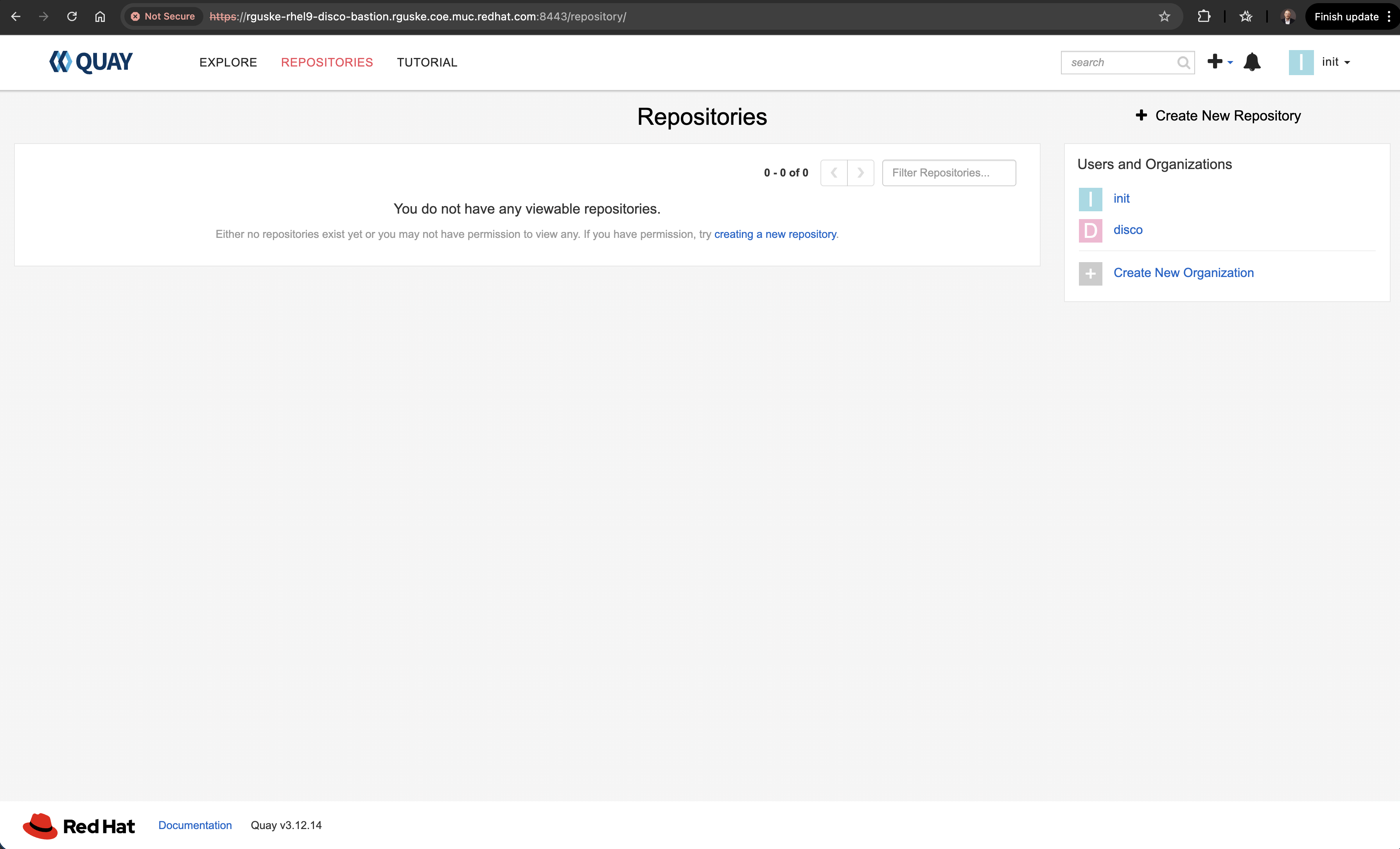
sudo systemctl list-units --type service | grep quay
  quay-app.service                                      loaded active running Quay Container
  quay-pod.service                                      loaded active exited  Infra Container for Quay
  quay-redis.service                                    loaded active running Redis Podman Container for Quay
You must have access to the internet to obtain the necessary container images. In this procedure, you place your mirror registry on a mirror host that has access to both your network and the internet. If you do not have access to a mirror host, use the Mirroring Operator catalogs for use with disconnected clusters procedure to copy images to a device you can move across network boundaries with.
Procedure and prerequisites:
You configured a mirror registry to use in your disconnected environment.
You identified an image repository location on your mirror registry to mirror images into.
You provisioned a mirror registry account that allows images to be uploaded to that image repository.
tee imagesetconfiguration.yaml > /dev/null <<'EOF'kind:ImageSetConfigurationapiVersion:mirror.openshift.io/v2alpha1mirror:platform:channels:-name:stable-4.21type:ocpshortestPath:trueminVersion:4.21.10maxVersion:4.21.11graph:trueoperators:-catalog:registry.redhat.io/redhat/redhat-operator-index:v4.21packages:## cincinnati-operator:v1-name:cincinnati-operatorchannels:-name:v1minVersion:'5.0.3'# maxVersion: '5.0.3'## kubernetes-nmstate-operator:stable-name:kubernetes-nmstate-operatorchannels:-name:'stable'minVersion:'4.21.0-202604080925'# maxVersion: '4.17.0-202502120148'## kubevirt-hyperconverged:stable-name:kubevirt-hyperconvergedchannels:-name:stableminVersion:'4.21.3'# maxVersion: '4.17.4'## metallb-operator:stable-name:metallb-operatorchannels:-name:stableminVersion:'4.21.0-202604140043'# maxVersion: 'v4.17.0'## web-terminal:fast-name:web-terminalchannels:-name:fastminVersion:'1.16.0'# maxVersion: 'v1.15.0'## web-terminal relies on devworkspace-operator# - name: devworkspace-operator# channels:# - name: fast# minVersion: '0.40-1776457293'## OpenShift Data Foundation-name:odf-operatorchannels:-name:stable-4.21minVersion:'4.21.2-rhodf'## OpenShift Local Storage Operator-name:local-storage-operatorchannels:-name:stableminVersion:'4.21.0-202604200440'additionalImages:-name:registry.redhat.io/ubi8/ubi:latest-name:registry.redhat.io/rhel9/rhel-guest-image:latest-name:quay.io/rhn_support_sreber/curl:latest# Important for KMM & GPFS Build-name:registry.redhat.io/ubi9/ubi-minimal:latest-name:registry.redhat.io/ubi9/ubi@sha256:20f695d2a91352d4eaa25107535126727b5945bff38ed36a3e59590f495046f0-name:quay.io/rguske/vddk@sha256:26d07e11f7f8dcca263e83a1d942fe9274c90418c5bfc17fad88b61ddabf95ed-name:quay.io/rguske/simple-web-app@sha256:f1c474d0b214975d2fb95d14967b620daa0cdbef094ee509fec1659d55c3a6de# Virtualization Images-name:quay.io/containerdisks/centos-stream:9-name:quay.io/containerdisks/fedora:latestEOF
Ensure that clis are in your $PATH. Otherwise export PATH=/usr/local/bin:$PATH.
The oc-mirror plugin v2 automatically generates the following custom resources:
ImageDigestMirrorSet (IDMS): Handles registry mirror rules when using image digest pull specifications. Generated if at least one image of the image set is mirrored by digest.
ImageTagMirrorSet (ITMS): Handles registry mirror rules when using image tag pull specifications. Generated if at least one image from the image set is mirrored by tag.
CatalogSource: Retrieves information about the available Operators in the mirror registry. Used by Operator Lifecycle Manager (OLM) Classic.
ClusterCatalog: Retrieves information about the available cluster extensions (which includes Operators) in the mirror registry. Used by OLM v1.
UpdateService: Provides update graph data to the disconnected environment. Used by the OpenShift Update Service.
Mirror the images from the specified image set configuration to the disk by running the following command:
Installing a disconnected Cluster using the Agent Based Installer
When you use a disconnected mirror registry, you must add the certificate file that you created previously for your mirror registry to the additionalTrustBundle field of the install-config.yaml file.
The ssl certificate of the mirror-registry which will be used in the install-config.yaml can be found within the mirror-registry/root/quay-rootCA folder. Example: /home/rguske/downloads/mirror-registry/root/quay-rootCA
INFO Configuration has 3 master replicas, 0 arbiter replicas, and 0 worker replicas
WARNING The imageDigestSources configuration in install-config.yaml should have at least one source field matching the releaseImage value rguske-rhel9-disco-bastion.disco.local:8443/disco/openshift/release-images@sha256:5d591a70c92a6dfa3b6b948ffe5e5eac7ab339c49005744006aa0dd9d6d98898
INFO The rendezvous host IP (node0 IP) is 192.168.69.202
INFO Extracting base ISO from release payload
INFO Base ISO obtained from release and cached at [/home/rguske/.cache/agent/image_cache/coreos-x86_64.iso]
INFO Consuming Install Config from target directory
INFO Consuming Agent Config from target directory
INFO Generated ISO at /home/rguske/openshift/rguske-ocp42-disco/conf/agent.x86_64.iso.
If you still have problemes with the release-image reference use:
Copy (scp agent.x86_64.iso root@192.168.69.208:/root/download/) the agent.iso from the mirror registry to the bastion host which has access to the target (ESXi server for example).
Copy the created iso into /var/www/html/ on the bastion host.
Download the iso by using e.g. wget http://<bastion-name/ip>/agent.x86_64.iso.
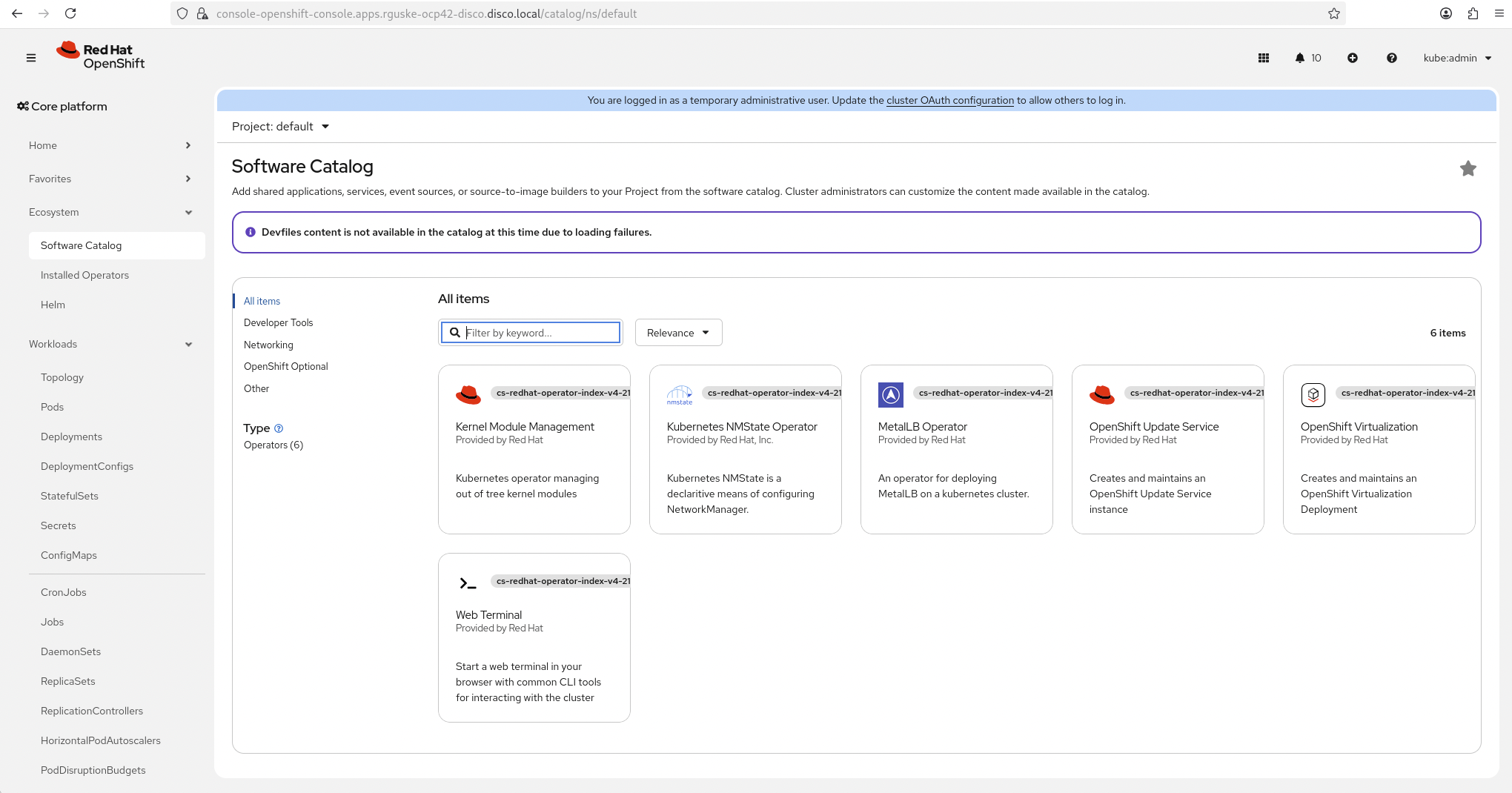
Install the OpenShift Update Serve Operator and create the instance using the created file which is located in /home/rguske/openshift/mirror/working-dir/cluster-resources/:
The update service will be available after applying the configuration but it'll not trust your registry. Therefore, a ConfigMap with the root certificate of yopur mirror registry needs to be created.
You can add references to a config map that has additional certificate authorities (CAs) to be trusted during image registry access to the image.config.openshift.io/cluster custom resource (CR).
Important is, that the name of your mirror registry is included as well as the name updateservice-registry, which will be picked up by the CLuster Service Operator.
oc -n openshift-update-service get route
NAME                             HOST/PORT                                                                                     PATH   SERVICES                                 PORT            TERMINATION   WILDCARD
update-service-oc-mirror-route   update-service-oc-mirror-route-openshift-update-service.apps.rguske-ocp42-disco.disco.local          update-service-oc-mirror-policy-engine   policy-engine   edge/None     None
After updating the route via the WebConsole in Administration - Cluster Settings - Upstream Configuration, the Service will complain about the not trusted cluster certificate.
It is necessary to patch the cluster-wide proxy configuration with a config map object which contains the cluster self-signed certificate.
[{"api_vips":[{"cluster_id":"ceeb9d66-c894-4224-adcc-72283fd213f4","ip":"192.168.69.200","verification":"succeeded"}],"base_dns_domain":"disco.local","cluster_networks":[{"cidr":"10.128.0.0/14","cluster_id":"ceeb9d66-c894-4224-adcc-72283fd213f4","host_prefix":23}],"connectivity_majority_groups":"{\"majority_groups\":{\"192.168.69.0/24\":[\"35ddb3ef-1234-5220-b32c-331d1cb817a3\",\"96f0818e-1d12-5a86-ab09-ddaacf305552\",\"9bda5859-ae9b-5c6f-87ac-8904cc41b857\"],\"IPv4\":[\"35ddb3ef-1234-5220-b32c-331d1cb817a3\",\"96f0818e-1d12-5a86-ab09-ddaacf305552\",\"9bda5859-ae9b-5c6f-87ac-8904cc41b857\"],\"IPv6\":[]},\"l3_connected_addresses\":{\"35ddb3ef-1234-5220-b32c-331d1cb817a3\":[\"192.168.69.203\"],\"96f0818e-1d12-5a86-ab09-ddaacf305552\":[\"192.168.69.204\"],\"9bda5859-ae9b-5c6f-87ac-8904cc41b857\":[\"192.168.69.202\"]}}","control_plane_count":3,"controller_logs_collected_at":"0001-01-01T00:00:00.000Z","controller_logs_started_at":"0001-01-01T00:00:00.000Z","cpu_architecture":"x86_64","created_at":"2026-04-27T06:55:16.101392Z","deleted_at":null,"disk_encryption":{"enable_on":"none","mode":"tpmv2"},"email_domain":"Unknown","enabled_host_count":3,"feature_usage":"{\"Hyperthreading\":{\"data\":{\"hyperthreading_enabled\":\"all\"},\"id\":\"HYPERTHREADING\",\"name\":\"Hyperthreading\"},\"OVN network type\":{\"id\":\"OVN_NETWORK_TYPE\",\"name\":\"OVN network type\"},\"Static Network Config\":{\"id\":\"STATIC_NETWORK_CONFIG\",\"name\":\"Static Network Config\"}}","high_availability_mode":"Full","host_networks":null,"hosts":[],"href":"/api/assisted-install/v2/clusters/ceeb9d66-c894-4224-adcc-72283fd213f4","hyperthreading":"all","id":"ceeb9d66-c894-4224-adcc-72283fd213f4","ignition_endpoint":{},"image_info":{"created_at":"2026-04-27T06:55:16.101392Z","expires_at":"0001-01-01T00:00:00.000Z"},"ingress_vips":[{"cluster_id":"ceeb9d66-c894-4224-adcc-72283fd213f4","ip":"192.168.69.201","verification":"succeeded"}],"install_completed_at":"0001-01-01T00:00:00.000Z","install_started_at":"0001-01-01T00:00:00.000Z","ip_collisions":"{}","kind":"Cluster","last-installation-preparation":{},"load_balancer":{"type":"cluster-managed"},"machine_networks":[{"cidr":"192.168.69.0/24","cluster_id":"ceeb9d66-c894-4224-adcc-72283fd213f4"}],"monitored_operators":[{"bundles":null,"cluster_id":"ceeb9d66-c894-4224-adcc-72283fd213f4","name":"console","operator_type":"builtin","status_updated_at":"0001-01-01T00:00:00.000Z","timeout_seconds":3600}],"name":"rguske-ocp42-disco","network_type":"OVNKubernetes","ocp_release_image":"rguske-rhel9-disco-bastion.disco.local:8443/disco/openshift/release-images@sha256:5d591a70c92a6dfa3b6b948ffe5e5eac7ab339c49005744006aa0dd9d6d98898","openshift_version":"4.21.10","org_soft_timeouts_enabled":true,"platform":{"external":{},"type":"baremetal"},"progress":{"finalizing_stage_started_at":"0001-01-01T00:00:00.000Z"},"pull_secret_set":true,"ready_host_count":1,"schedulable_masters":false,"schedulable_masters_forced_true":true,"service_networks":[{"cidr":"172.30.0.0/16","cluster_id":"ceeb9d66-c894-4224-adcc-72283fd213f4"}],"ssh_public_key":"ssh-ed25519 AAAAC3NzaC1lZDI1NTE5AAAAIODE9JnscEgdhihWM2xsqlqsRgBjkVzGQ/Ur5Ek0v9gF rguske@rguske-rhel9-disco-bastion.rguske.coe.muc.redhat.com","status":"insufficient","status_info":"Cluster is not ready for install","status_updated_at":"2026-04-27T06:55:16.099Z","total_host_count":3,"updated_at":"2026-04-27T06:56:30.886142Z","user_managed_networking":false,"user_name":"admin","validations_info":"{\"configuration\":[{\"id\":\"platform-requirements-satisfied\",\"status\":\"success\",\"message\":\"Platform requirements satisfied\"},{\"id\":\"pull-secret-set\",\"status\":\"success\",\"message\":\"The pull secret is set.\"}],\"hosts-data\":[{\"id\":\"all-hosts-are-ready-to-install\",\"status\":\"failure\",\"message\":\"The cluster has hosts that are not ready to install.\"},{\"id\":\"sufficient-masters-count\",\"status\":\"success\",\"message\":\"The cluster has the exact amount of dedicated control plane nodes.\"}],\"network\":[{\"id\":\"api-vips-defined\",\"status\":\"success\",\"message\":\"API virtual IPs are defined.\"},{\"id\":\"api-vips-valid\",\"status\":\"success\",\"message\":\"api vips 192.168.69.200 belongs to the Machine CIDR and is not in use.\"},{\"id\":\"cluster-cidr-defined\",\"status\":\"success\",\"message\":\"The Cluster Network CIDR is defined.\"},{\"id\":\"dns-domain-defined\",\"status\":\"success\",\"message\":\"The base domain is defined.\"},{\"id\":\"ingress-vips-defined\",\"status\":\"success\",\"message\":\"Ingress virtual IPs are defined.\"},{\"id\":\"ingress-vips-valid\",\"status\":\"success\",\"message\":\"ingress vips 192.168.69.201 belongs to the Machine CIDR and is not in use.\"},{\"id\":\"machine-cidr-defined\",\"status\":\"success\",\"message\":\"The Machine Network CIDR is defined.\"},{\"id\":\"machine-cidr-equals-to-calculated-cidr\",\"status\":\"success\",\"message\":\"The Cluster Machine CIDR is equivalent to the calculated CIDR.\"},{\"id\":\"network-prefix-valid\",\"status\":\"success\",\"message\":\"The Cluster Network prefix is valid.\"},{\"id\":\"network-type-valid\",\"status\":\"success\",\"message\":\"The cluster has a valid network type\"},{\"id\":\"networks-same-address-families\",\"status\":\"success\",\"message\":\"Same address families for all networks.\"},{\"id\":\"no-cidrs-overlapping\",\"status\":\"success\",\"message\":\"No CIDRS are overlapping.\"},{\"id\":\"ntp-server-configured\",\"status\":\"success\",\"message\":\"No ntp problems found\"},{\"id\":\"service-cidr-defined\",\"status\":\"success\",\"message\":\"The Service Network CIDR is defined.\"}],\"operators\":[{\"id\":\"amd-gpu-requirements-satisfied\",\"status\":\"success\",\"message\":\"amd-gpu is disabled\"},{\"id\":\"authorino-requirements-satisfied\",\"status\":\"success\",\"message\":\"authorino is disabled\"},{\"id\":\"cluster-observability-requirements-satisfied\",\"status\":\"success\",\"message\":\"cluster-observability is disabled\"},{\"id\":\"cnv-requirements-satisfied\",\"status\":\"success\",\"message\":\"cnv is disabled\"},{\"id\":\"fence-agents-remediation-requirements-satisfied\",\"status\":\"success\",\"message\":\"fence-agents-remediation is disabled\"},{\"id\":\"kmm-requirements-satisfied\",\"status\":\"success\",\"message\":\"kmm is disabled\"},{\"id\":\"kube-descheduler-requirements-satisfied\",\"status\":\"success\",\"message\":\"kube-descheduler is disabled\"},{\"id\":\"loki-requirements-satisfied\",\"status\":\"success\",\"message\":\"loki is disabled\"},{\"id\":\"lso-requirements-satisfied\",\"status\":\"success\",\"message\":\"lso is disabled\"},{\"id\":\"lvm-requirements-satisfied\",\"status\":\"success\",\"message\":\"lvm is disabled\"},{\"id\":\"mce-requirements-satisfied\",\"status\":\"success\",\"message\":\"mce is disabled\"},{\"id\":\"metallb-requirements-satisfied\",\"status\":\"success\",\"message\":\"metallb is disabled\"},{\"id\":\"mtv-requirements-satisfied\",\"status\":\"success\",\"message\":\"mtv is disabled\"},{\"id\":\"nmstate-requirements-satisfied\",\"status\":\"success\",\"message\":\"nmstate is disabled\"},{\"id\":\"node-feature-discovery-requirements-satisfied\",\"status\":\"success\",\"message\":\"node-feature-discovery is disabled\"},{\"id\":\"node-healthcheck-requirements-satisfied\",\"status\":\"success\",\"message\":\"node-healthcheck is disabled\"},{\"id\":\"node-maintenance-requirements-satisfied\",\"status\":\"success\",\"message\":\"node-maintenance is disabled\"},{\"id\":\"numa-resources-requirements-satisfied\",\"status\":\"success\",\"message\":\"numaresources is disabled\"},{\"id\":\"nvidia-gpu-requirements-satisfied\",\"status\":\"success\",\"message\":\"nvidia-gpu is disabled\"},{\"id\":\"oadp-requirements-satisfied\",\"status\":\"success\",\"message\":\"oadp is disabled\"},{\"id\":\"odf-requirements-satisfied\",\"status\":\"success\",\"message\":\"odf is disabled\"},{\"id\":\"openshift-ai-requirements-satisfied\",\"status\":\"success\",\"message\":\"openshift-ai is disabled\"},{\"id\":\"openshift-logging-requirements-satisfied\",\"status\":\"success\",\"message\":\"openshift-logging is disabled\"},{\"id\":\"osc-requirements-satisfied\",\"status\":\"success\",\"message\":\"osc is disabled\"},{\"id\":\"pipelines-requirements-satisfied\",\"status\":\"success\",\"message\":\"pipelines is disabled\"},{\"id\":\"self-node-remediation-requirements-satisfied\",\"status\":\"success\",\"message\":\"self-node-remediation is disabled\"},{\"id\":\"serverless-requirements-satisfied\",\"status\":\"success\",\"message\":\"serverless is disabled\"},{\"id\":\"servicemesh-requirements-satisfied\",\"status\":\"success\",\"message\":\"servicemesh is disabled\"}]}","vip_dhcp_allocation":false}]
My cluster was stuck in validation progress because of a simple "copy/paste" mistake at the hostname section. I had two times the same hostname configured...
Affected hosts:

Host ID 35ddb3ef-...
Host ID 96f0818e-...

Validation failure:

hostname-unique = failure
Hostname rguske-ocp42-disco-2.disco.local is not unique in cluster
If the discovery was successful, run: journalctl -b -f -u release-image.service -u bootkube.service -u node-image-pull.service -f