Skip to content

OpenShift on STACKIT (UPI)

POC / lab topology

Single failure domain, no STACKIT AZ spread, hand-built LBs and DNS. Suitable for proving the path, not as a production reference architecture.

Platform-agnostic / user-provisioned install: Installing a cluster on any platform (platform: none).

Outline

  • RHCOS qcow2 in STACKIT as boot image
  • DNS zone + records (api, api-int, *.apps)
  • Two LBs: internal (6443, 22623) and external (6443, 80/443)
  • openshift-install create ignition-configs locally; per-node Butane → Ignition in user-data
  • Bootstrap Ignition in object storage (too large for metadata user-data alone — fetch URL from small stub config)
  • VMs up → bootstrap completes → remove bootstrap VM + object → approve CSRs if needed → install-complete

Admin host tooling

  • jq, s3cmd, Butane, openshift-install / oc (matching cluster version, e.g. 4.21.x)
  • STACKIT CLI: stackit auth login, stackit config set --project-id …

RHCOS image

1
2
3
URL=$(./openshift-install coreos print-stream-json | jq -r '.architectures.x86_64.artifacts.openstack.formats["qcow2.gz"].disk.location')
curl -L -O "$URL"
gzip -d "$(basename "$URL")"

Upload qcow2 (adjust name to match your stream build):

1
2
3
4
5
stackit image create \
  --name rhcos-9.6.20251212.x86_64 \
  --disk-format=qcow2 \
  --local-file-path=rhcos-9.6.20251212-1-openstack.x86_64.qcow2 \
  --labels os=linux,distro=rhel,version=9.6

SSH key for core

ssh-keygen -t ed25519 -C "ocp-on-stackit" -f ~/.ssh/ocp-on-stackit -N ""

Public key goes into install-config.yaml; private key for ssh core@… during bring-up.

STACKIT project baseline

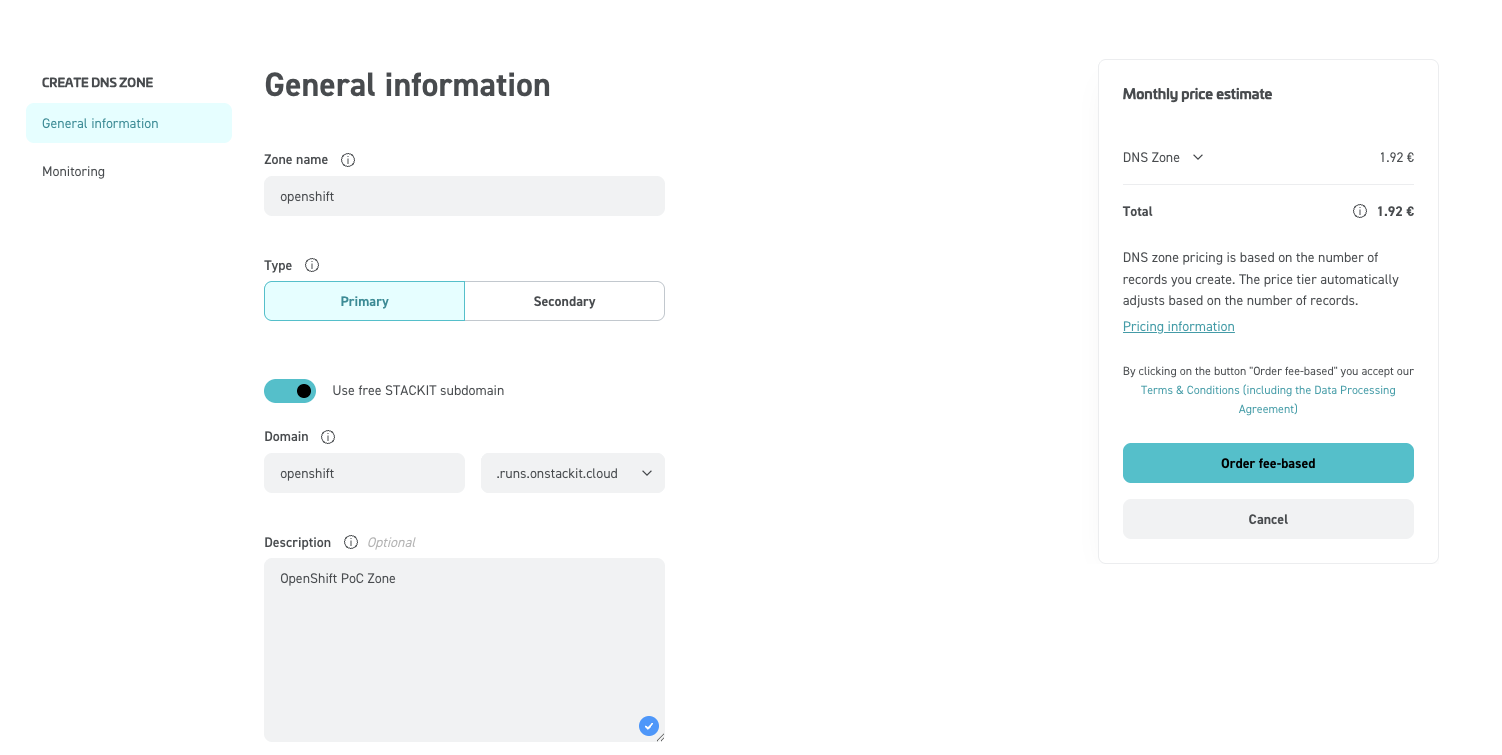
DNS zone

Primary zone for the install base domain (portal example: DNS zone). CLI list:

1
2
3
4
5
stackit dns zone list

 ID                                    NAME       STATE             TYPE     DNS NAME                        RECORD COUNT
──────────────────────────────────────┼───────────┼──────────────────┼─────────┼────────────────────────────────┼──────────────
 <ZONE ID>                             openshift  CREATE_SUCCEEDED  primary  openshift.runs.onstackit.cloud  0

Private network

stackit network create --name openshift --ipv4-prefix "10.0.0.0/24"
# note Network ID for server and LB args

Optional: helper / jump VM

For metadata checks, pulling artifacts, or debugging from inside the VPC. Butane source:

curl -L -O https://examples.openshift.pub/cluster-installation/stackit/ign-helper.rcc
variant: fcos
version: 1.5.0
ignition:
  config:
    merge:
      - source: "https://ignition.object.storage.eu01.onstackit.cloud/bootstrap.ign"

storage:
  files:
    - path: /etc/hostname
      overwrite: true
      contents:
        source: data:,helper
      mode: 0420
    - path: /home/core/.ssh/id_ed25519
      overwrite: true
      contents:
        local: .ssh/ocp-on-stackit
      mode: 0600
    - path: /home/core/.ssh/id_ed25519.pub
      overwrite: true
      contents:
        local: .ssh/ocp-on-stackit.pub
      mode: 0600
passwd:
  users:
    - name: core
      password_hash: "$y$j9T$15cuONdoH5AKB62c9qTtD.$oOf4GqrwEnNzT7WuEFvkDuSOyv2xIx/z4EXzbQivdO0"
      ssh_authorized_keys_local: 
        - .ssh/ocp-on-stackit.pub
stackit server create \
  --machine-type g1a.1d \
  --name helper \
  --boot-volume-source-type image \
  --boot-volume-source-id <RHCOS_IMAGE_ID> \
  --boot-volume-delete-on-termination \
  --boot-volume-size 120 \
  --network-id <NETWORK_ID> \
  --user-data @<(butane -d ~ -r ign-helper.rcc)
# Note server id

% stackit public-ip create
# Note public ip and ID

% stackit server public-ip attach \
  <PUBLIC-IP ID> \
  --server-id <SERVER ID>
% stackit security-group create --name allow-ssh
# Note security-group id

% stackit security-group rule create \
  --security-group-id <SECURITY-GROUP ID> \
  --direction ingress \
  --protocol-name tcp \
  --port-range-min 22 \
  --port-range-max 22

% stackit server security-group attach \
  --server-id <SERVER ID> \
  --security-group-id <SECURITY-GROUP ID>

% ssh -l core -i ~/.ssh/ocp-on-stackit <PUBLIC IP>
...
[core@helper ~]$ curl -s -q http://169.254.169.254/openstack/2012-08-10/meta_data.json | jq
{
  "uuid": "6f3fcf4f-c813-4cd6-b55d-b6fe309996f3",
  "hostname": "helper",
  "name": "helper",
  "launch_index": 0,
  "availability_zone": "eu01-m"
}

Object store

Object storage (bootstrap Ignition)

stackit object-storage enable
stackit object-storage bucket create ignition

stackit object-storage credentials create has been observed to panic in some CLI versions — create S3-compatible keys in the portal if needed.

Bootstrap object visibility

A wide-open bucket policy makes bootstrap.ign (cluster secrets) world-readable. Tighten to source IPs or VPC egress only; remove or restrict policy after bootstrap.

curl -L -O https://examples.openshift.pub/cluster-installation/stackit/s3-policy-all-public.json
{
    "Statement":[
        {
            "Sid": "allow-all",
            "Effect":"Allow",
            "Principal":"*",
            "Action":"s3:GetObject",
            "Resource":"urn:sgws:s3:::ignition/*"
        }
    ]
}
s3cmd --configure   # endpoint + keys from STACKIT object storage
s3cmd setpolicy s3-policy-all-public.json s3://ignition

Clear policy when done: s3cmd delpolicy s3://ignition

Ignition and install config

curl -L -O https://examples.openshift.pub/cluster-installation/stackit/install-config.yaml
apiVersion: v1
baseDomain: openshift.runs.onstackit.cloud
compute:
  - name: worker
    architecture: amd64
    hyperthreading: Enabled
    platform: {}
    replicas: 3
controlPlane:
  architecture: amd64
  hyperthreading: Enabled
  name: master
  platform: {}
  replicas: 3
metadata:
  name: cluster-a
networking:
  clusterNetwork:
    - cidr: 10.128.0.0/14
      hostPrefix: 23
  machineNetwork:
    - cidr: 10.0.0.0/24
  serviceNetwork:
    - 172.30.0.0/16
  type: OVNKubernetes
platform:
  none: {}

pullSecret: |
  REPLACE WITH YOUR PULL SECRET
sshKey: |
  REPLACE SSH KEY HERE from ~/.ssh/ocp-on-stackit.pub
Adjust install-config.yaml

Edit pullSecret, sshKey, and optionally metadata.name / baseDomain / machine replicas, then:

1
2
3
mkdir -p conf
cp install-config.yaml conf/
./openshift-install create ignition-configs --dir conf

Preserves conf/install-config.yaml (do not commit); emits bootstrap.ign, master/worker stubs, and auth/.

Upload bootstrap payload (the merge source in ign-bootstrap.rcc must match this object’s reachable HTTPS URL):

s3cmd put conf/bootstrap.ign s3://ignition/

Per-node Butane in this repo: bootstrap merges the object-store URL of bootstrap.ign; control plane nodes merge conf/master.ign, workers merge conf/worker.ign (paths relative to butane -d .).

Download node configs (or maintain alongside repo):

1
2
3
for node in bootstrap control-plane-0 control-plane-1 control-plane-2 worker-0 worker-1 worker-2; do
  curl -L -O https://examples.openshift.pub/cluster-installation/stackit/ign-${node}.rcc
done
variant: fcos
version: 1.5.0
ignition:
  config:
    merge:
      - source: "https://ignition.object.storage.eu01.onstackit.cloud/bootstrap.ign"
storage:
  files:
    - path: /etc/hostname
      overwrite: true
      contents:
        source: data:,bootstrap
      mode: 420
variant: fcos
version: 1.5.0
ignition:
  config:
    merge:
      - local: "conf/master.ign"
storage:
  files:
    - path: /etc/hostname
      overwrite: true
      contents:
        source: data:,control-plane-0
      mode: 420
variant: fcos
version: 1.5.0
ignition:
  config:
    merge:
      - local: "conf/master.ign"
storage:
  files:
    - path: /etc/hostname
      overwrite: true
      contents:
        source: data:,control-plane-1
      mode: 420
variant: fcos
version: 1.5.0
ignition:
  config:
    merge:
      - local: "conf/master.ign"
storage:
  files:
    - path: /etc/hostname
      overwrite: true
      contents:
        source: data:,control-plane-2
      mode: 420
variant: fcos
version: 1.5.0
ignition:
  config:
    merge:
      - local: "conf/worker.ign"
storage:
  files:
    - path: /etc/hostname
      overwrite: true
      contents:
        source: data:,worker-0
      mode: 420
variant: fcos
version: 1.5.0
ignition:
  config:
    merge:
      - local: "conf/worker.ign"
storage:
  files:
    - path: /etc/hostname
      overwrite: true
      contents:
        source: data:,worker-1
      mode: 420
variant: fcos
version: 1.5.0
ignition:
  config:
    merge:
      - local: "conf/worker.ign"
storage:
  files:
    - path: /etc/hostname
      overwrite: true
      contents:
        source: data:,worker-2
      mode: 420

Create servers

Use your RHCOS image ID and network ID; c2a.8d (or larger) is an example flavor.

for node in bootstrap control-plane-0 control-plane-1 control-plane-2 worker-0 worker-1 worker-2; do
  stackit server create \
    --assume-yes --async \
    --machine-type c2a.8d \
    --name "cluster-a-${node}" \
    --boot-volume-source-type image \
    --boot-volume-source-id <RHCOS_IMAGE_ID> \
    --boot-volume-delete-on-termination \
    --boot-volume-size 120 \
    --network-id <NETWORK_ID> \
    --user-data @<(butane -d . -r "ign-${node}.rcc")
done

stackit server list until nodes have addresses; map them into LB target pools and DNS as below.

Load balancers and DNS

Internal LB — api-int (6443, 22623)

curl -L -O https://examples.openshift.pub/cluster-installation/stackit/stackit-lb-int.json
{
    "listeners": [
      {
        "displayName": "api",
        "port": 6443,
        "protocol": "PROTOCOL_TCP",
        "targetPool": "api"
      },{
        "displayName": "machine-config-server",
        "port": 22623,
        "protocol": "PROTOCOL_TCP",
        "targetPool": "machine-config-server"
      }
    ],
    "name": "lb-int",
    "networks": [
      {
        "networkId": "<REPLACE WITH NETWORK_ID>",
        "role": "ROLE_LISTENERS_AND_TARGETS"
      }
    ],
    "options": {
      "accessControl": {
        "allowedSourceRanges": [
          "10.0.0.0/24"
        ]
      },
      "ephemeralAddress": false,
      "privateNetworkOnly": true
    },
    "planId": "p10",
    "targetPools": [
      {
        "name": "api",
        "targetPort": 6443,
        "targets": [
          { "displayName": "bootstrap","ip": "REPLACE WITH IP OF BOOTSTRAP NODE"},
          { "displayName": "control-plane-0","ip": "REPLACE WITH IP OF CONTROL PLANE 0 NODE"},
          { "displayName": "control-plane-1","ip": "REPLACE WITH IP OF CONTROL PLANE 1 NODE"},
          { "displayName": "control-plane-2","ip": "REPLACE WITH IP OF CONTROL PLANE 2 NODE"}
        ]
      },
      {
        "name": "machine-config-server",
        "targetPort": 22623,
        "targets": [
          { "displayName": "bootstrap","ip": "REPLACE with IP"},
          { "displayName": "control-plane-0","ip": "REPLACE WITH IP OF CONTROL PLANE 0 NODE"},
          { "displayName": "control-plane-1","ip": "REPLACE WITH IP OF CONTROL PLANE 1 NODE"},
          { "displayName": "control-plane-2","ip": "REPLACE WITH IP OF CONTROL PLANE 2 NODE"}
        ]
      }
    ]
}
Adjust stackit-lb-int.json

Fill target pools with control plane node IPs (API + MCS). Create LB:

stackit load-balancer create --payload @stackit-lb-int.json

Private VIP may not appear in stackit load-balancer list — take listener / pool IP from API or portal when wiring DNS.

api-int.<cluster_name> A record → internal LB VIP (example):

1
2
3
4
5
stackit dns record-set create \
  --zone-id <ZONE_ID> \
  --name api-int.cluster-a \
  --record 10.0.0.195 \
  --ttl 60

External LB — api and *.apps (6443, 80, 443)

Reserve a public IP for the external LB; point both api.<name>.<baseDomain> and *.apps.<name>.<baseDomain> at it (wildcard apps record).

1
2
3
4
stackit public-ip create
# attach to external LB / listener as required by STACKIT networking model
stackit dns record-set create --zone-id <ZONE_ID> --name api.cluster-a --record <PUBLIC_IP> --ttl 60
stackit dns record-set create --zone-id <ZONE_ID> --name '*.apps.cluster-a' --record <PUBLIC_IP> --ttl 60
curl -L -O https://examples.openshift.pub/cluster-installation/stackit/stackit-lb-ext.json
{
    "externalAddress": "<REPLACE WITH EXTERNAL IP ADDRESS>",
    "listeners": [
      {
        "displayName": "api",
        "port": 6443,
        "protocol": "PROTOCOL_TCP",
        "targetPool": "api"
      },{
        "displayName": "ingress-http",
        "port": 80,
        "protocol": "PROTOCOL_TCP",
        "targetPool": "ingress-http"
      },{
        "displayName": "ingress-https",
        "port": 443,
        "protocol": "PROTOCOL_TCP",
        "targetPool": "ingress-https"
      }
    ],
    "name": "lb-ext",
    "networks": [
      {
        "networkId": "<REPLACE WITH NETWORK_ID>",
        "role": "ROLE_LISTENERS_AND_TARGETS"
      }
    ],
    "options": {
      "ephemeralAddress": false,
      "privateNetworkOnly": false
    },
    "planId": "p10",
    "targetPools": [
      {
        "name": "api",
        "targetPort": 6443,
        "targets": [
          { "displayName": "bootstrap","ip": "REPLACE WITH IP OF BOOTSTRAP NODE"},
          { "displayName": "control-plane-0","ip": "REPLACE WITH IP OF CONTROL PLANE 0 NODE"},
          { "displayName": "control-plane-1","ip": "REPLACE WITH IP OF CONTROL PLANE 1 NODE"},
          { "displayName": "control-plane-2","ip": "REPLACE WITH IP OF CONTROL PLANE 2 NODE"}
        ]
      },
      {
        "name": "ingress-http",
        "targetPort": 80,
        "targets": [
          { "displayName": "worker-0","ip": "REPLACE WITH IP OF WORKER 0 NODE"},
          { "displayName": "worker-1","ip": "REPLACE WITH IP OF WORKER 1 NODE"},
          { "displayName": "worker-2","ip": "REPLACE WITH IP OF WORKER 2 NODE"}
        ]
      },
      {
        "name": "ingress-https",
        "targetPort": 443,
        "targets": [
          { "displayName": "worker-0","ip": "REPLACE WITH IP OF WORKER 0 NODE"},
          { "displayName": "worker-1","ip": "REPLACE WITH IP OF WORKER 1 NODE"},
          { "displayName": "worker-2","ip": "REPLACE WITH IP OF WORKER 2 NODE"}
        ]
      }
    ]
}
Adjust stackit-lb-ext.json

Adjust listeners and backends (API → masters; 80/443 → workers or ingress nodes), then:

stackit load-balancer create --payload @stackit-lb-ext.json

Bootstrap teardown and finish

./openshift-install wait-for bootstrap-complete --dir conf
s3cmd delete s3://ignition/bootstrap.ign
stackit server delete <bootstrap-server-id>

CSRs (if Pending — common when kubelet/API timing is tight):

export KUBECONFIG="$PWD/conf/auth/kubeconfig"
oc get csr | awk '/Pending/{print $1}' | xargs oc adm certificate approve

Re-run until nothing pending; machine-approver normally takes over post-bootstrap.

./openshift-install wait-for install-complete --dir conf

Console URL and kubeadmin password are printed on success.

Day-2: default Ingress TLS

Let’s Encrypt via cert-manager (DNS-01 / STACKIT)

Install cert-manager Operator for Red Hat OpenShift from OperatorHub (align minor with cluster; ships CRDs + controller).

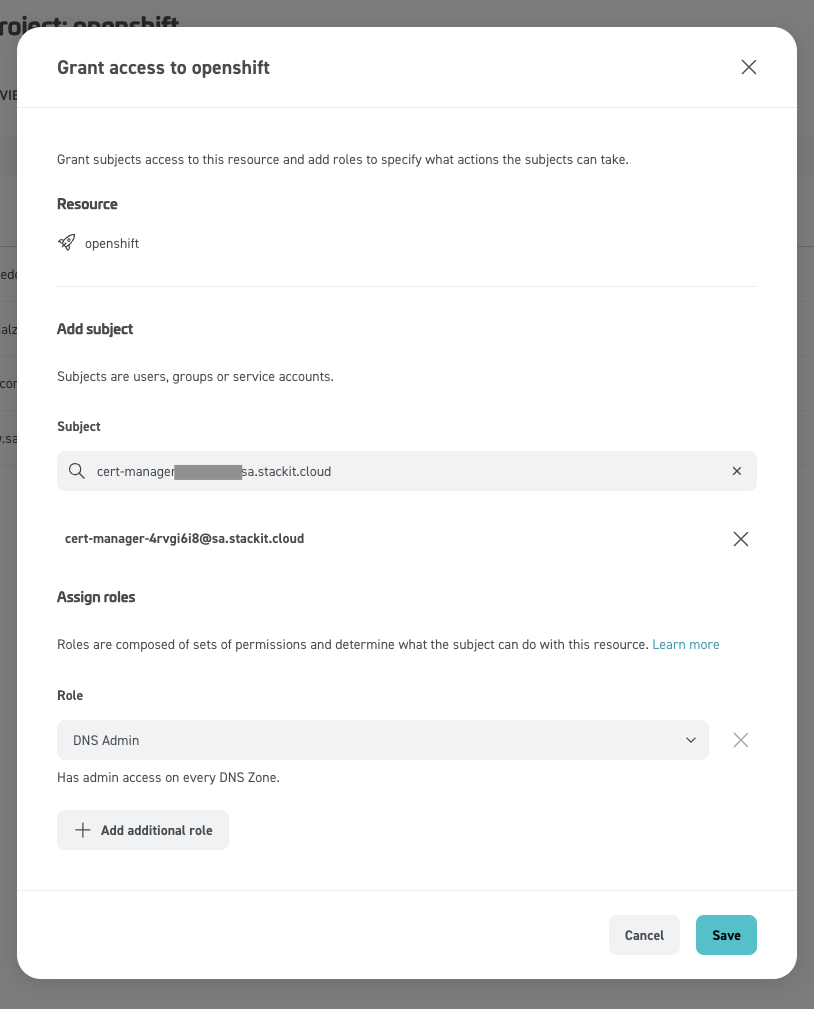
Webhook identity — the STACKIT cert-manager webhook needs API credentials for DNS in the project that owns the public zone for *.apps (typically the same project as the cluster).

stackit service-account create --name cert-manager
# Export the service-account key JSON from the portal; keep it off shell history and out of docs.

Grant that principal DNS admin (or equivalent) on the zone:

Secret name below should match Helm values / webhook config for the STACKIT SA file:

1
2
3
oc create secret generic stackit-sa-authentication \
  -n cert-manager \
  --from-file=sa.json=./stackit-cert-manager-sa.json

Webhook (Helm):

1
2
3
4
5
6
7
helm repo add stackit-cert-manager-webhook https://stackitcloud.github.io/stackit-cert-manager-webhook
helm repo update
helm install stackit-cert-manager-webhook stackit-cert-manager-webhook/stackit-cert-manager-webhook \
  --namespace cert-manager \
  --create-namespace

oc -n cert-manager adm policy add-scc-to-user nonroot-v2 -z stackit-cert-manager-webhook

If the chart exposes secret name / key path values, point them at stackit-sa-authentication / sa.json.

ClusterIssuer (production ACME; use Let’s Encrypt staging while debugging):

apiVersion: cert-manager.io/v1
kind: ClusterIssuer
metadata:
  name: letsencrypt-prod
spec:
  acme:
    server: https://acme-v02.api.letsencrypt.org/directory
    email: Repalce # Replace this with your email address
    privateKeySecretRef:
      name: letsencrypt-prod
    solvers:
      - dns01:
          webhook:
            solverName: stackit
            groupName: acme.stackit.de
            config:
              projectId: "<STACKIT_PROJECT_ID>"

Wildcard Certificate in openshift-ingress for the default router:

apiVersion: cert-manager.io/v1
kind: Certificate
metadata:
  name: letsencrypt-wildcard
  namespace: openshift-ingress
spec:
  secretName: letsencrypt-wildcard
  issuerRef:
    group: cert-manager.io
    name: letsencrypt-prod
    kind: ClusterIssuer
  commonName: '*.apps.cluster-a.openshift.runs.onstackit.cloud' # project must be the owner of this zone
  duration: 8760h0m0s
  dnsNames:
    - '*.apps.cluster-a.openshift.runs.onstackit.cloud'

Match dnsNames / commonName to your apps subdomain. The projectId in the issuer must be allowed to publish _acme-challenge for that zone.

Observe issuance (DNS-01 can take several minutes):

oc -n openshift-ingress get certificate,order,challenge
oc -n openshift-ingress describe certificate letsencrypt-wildcard

Default IngressController → issued secret:

oc patch ingresscontroller/default -n openshift-ingress-operator --type=merge \
  --patch '{"spec":{"defaultCertificate":{"name":"letsencrypt-wildcard"}}}'

Until the secret is populated, the router keeps serving the installer default; after issuance, HAProxy reload picks up the Let’s Encrypt chain.

Day-2: Add GPU node

Extra worker that merges the same conf/worker.ign as the other workers (hostname-only delta in Butane). Pick a GPU flavor and AZ that exist in your project.

curl -L -O https://examples.openshift.pub/cluster-installation/stackit/ign-gpu-worker-0.rcc
variant: fcos
version: 1.5.0
ignition:
  config:
    merge:
      - local: "conf/worker.ign"
storage:
  files:
    - path: /etc/hostname
      overwrite: true
      contents:
        source: data:,gpu-worker-0
      mode: 420
stackit server create \
  --assume-yes \
  --availability-zone eu01-1 \
  --machine-type n2.14d.g1 \
  --name cluster-a-gpu-worker-0 \
  --boot-volume-source-type image \
  --boot-volume-source-id <RHCOS_IMAGE_ID> \
  --boot-volume-delete-on-termination \
  --boot-volume-size 120 \
  --network-id <NETWORK_ID> \
  --user-data @<(butane -d . -r ign-gpu-worker-0.rcc)

When the node registers, approve any lingering Pending CSRs:

export KUBECONFIG="$PWD/conf/auth/kubeconfig"
oc get csr | awk '/Pending/{print $1}' | xargs oc adm certificate approve

Install the NVIDIA GPU Operator (catalog channel + ClusterPolicy per your OCP version): NVIDIA GPU Operator on OpenShift.

Sanity-check after the operator has prepared the node runtime:

oc new-project gpu-test
oc apply -f - <<'EOF'
apiVersion: v1
kind: Pod
metadata:
  name: nvidia-smi
  namespace: gpu-test
spec:
  restartPolicy: Never
  containers:
    - name: nvidia-smi
      image: registry.redhat.io/rhai/base-image-cuda-13.0-rhel9:3.3.1-1775076057
      command: [nvidia-smi]
      resources:
        limits:
          nvidia.com/gpu: "1"
        requests:
          nvidia.com/gpu: "1"
EOF
oc wait -n gpu-test --for=condition=Ready pod/nvidia-smi --timeout=120s
oc logs -n gpu-test nvidia-smi

Example output (hardware-dependent):

1
2
3
4
5
6
7
Tue May  5 13:27:54 2026
+-----------------------------------------------------------------------------------------+
| NVIDIA-SMI 580.126.20             Driver Version: 580.126.20     CUDA Version: 13.0     |
+-----------------------------------------+------------------------+----------------------+
|   0  NVIDIA L40S                    On  |   00000000:05:00.0 Off |                    0 |
| N/A   29C    P8             36W /  350W |       0MiB /  46068MiB |      0%      Default |
+-----------------------------------------------------------------------------------------+

Pin the CUDA image digest in production; the tag above is illustrative.

Day-2: Cloud Controller Manager (CCM)

Prereq — STACKIT service account (reuse for CSI below):

  • Create a service account (e.g. ccm-and-csi), download the key JSON.
  • Grant Editor on the project that owns projectId / networkId in cloud.yaml.
oc create secret generic -n kube-system stackit-cloud-secret \
  --from-file=sa_key.json=./stackit-ccm-sa.json
curl -L -O https://examples.openshift.pub/cluster-installation/stackit/cloud.yaml
1
2
3
4
5
6
# cloud.yaml
global:
  projectId: <project id>
  region: eu01
loadBalancer:
  networkId: <network id>
oc create configmap -n kube-system stackit-cloud-config \
  --from-file=cloud.yaml=./cloud.yaml

Upstream RBAC + Service (pin a commit if you do not want main drifting):

1
2
3
CCM_BASE=https://raw.githubusercontent.com/stackitcloud/cloud-provider-stackit/main/deploy/cloud-controller-manager
oc apply -f "${CCM_BASE}/rbac.yaml"
oc apply -f "${CCM_BASE}/service.yaml"
oc apply -f https://examples.openshift.pub/cluster-installation/stackit/ccm-and-csi-deployment.yaml
apiVersion: apps/v1
kind: Deployment
metadata:
  name: stackit-cloud-controller-manager
  namespace: kube-system
spec:
  replicas: 2
  selector:
    matchLabels:
      app: stackit-cloud-controller-manager
  template:
    metadata:
      labels:
        app: stackit-cloud-controller-manager
    spec:
      serviceAccountName: stackit-cloud-controller-manager
      containers:
        - name: stackit-cloud-controller-manager
          image: ghcr.io/stackitcloud/cloud-provider-stackit/cloud-controller-manager:v1.36.0
          args:
            # CCM flags
            - --cloud-provider=stackit
            - --webhook-secure-port=0
            - --concurrent-service-syncs=3
            - --controllers=service-lb-controller
            - --authorization-always-allow-paths=/metrics
            - --leader-elect=true
            - --leader-elect-resource-name=stackit-cloud-controller-manager
          env:
            - name: STACKIT_SERVICE_ACCOUNT_KEY_PATH
              value: /etc/serviceaccount/sa_key.json
          ports:
            - containerPort: 10258
              hostPort: 10258
              name: https
              protocol: TCP
            - containerPort: 9090
              hostPort: 9090
              name: metrics
              protocol: TCP
          resources:
            limits:
              cpu: "0.5"
              memory: 500Mi
            requests:
              cpu: "0.1"
              memory: 100Mi
          volumeMounts:
            - mountPath: /etc/config
              name: cloud-config
            - mountPath: /etc/serviceaccount
              name: cloud-secret
      volumes:
        - name: cloud-config
          configMap:
            name: stackit-cloud-config
        - name: cloud-secret
          secret:
            secretName: stackit-cloud-secret
CCM panic observed

With cloud-controller-manager:v1.36.0 this deployment segfaulted right after startup (nil deref). Root cause not chased here. CSI dynamic provisioning still worked without a healthy CCM — storage does not depend on cloud Service LBs — but confirm for your image / region before assuming that split is always safe.

1
2
3
4
5
6
starting Controller
I0507 12:55:45.723462 1 serving.go:411] Generated self-signed cert in-memory
W0507 12:55:45.723531 1 client_config.go:683] Neither --kubeconfig nor --master was
specified. Using the inClusterConfig. This might not work.
panic: runtime error: invalid memory address or nil pointer dereference
[signal SIGSEGV: segmentation violation code=0x1 addr=0x18 pc=0x4fe685]

No further investigation, because it looks CSI works without CCM

Day-2: STACKIT CSI driver

Upstream CSI doc. Reuse the same STACKIT SA and cloud.yaml as in the CCM section.

The overlay sets namespace: stackit-csi-driver on all resources from the remote base. Put stackit-cloud-secret and stackit-cloud-config in that namespace — not kube-system — or the controller never mounts credentials.

1
2
3
4
5
oc new-project stackit-csi-driver
oc create secret generic -n stackit-csi-driver stackit-cloud-secret \
  --from-file=sa_key.json=./stackit-ccm-sa.json
oc create configmap -n stackit-csi-driver stackit-cloud-config \
  --from-file=cloud.yaml=./cloud.yaml

Node plugin needs host paths / devices; grant privileged to the node SA (narrow with a custom SCC later if you need to):

oc -n stackit-csi-driver adm policy add-scc-to-user privileged -z csi-stackit-node-sa

Working directory for kustomize build / oc apply -k: remote base is HTTPS (no git@ SSH key). Image tag override stays in the local overlay.

mkdir -p stackit-csi && cd stackit-csi
curl -L -O https://examples.openshift.pub/cluster-installation/stackit/csi/kustomization.yaml
apiVersion: kustomize.config.k8s.io/v1beta1
kind: Kustomization

namespace: stackit-csi-driver
resources:
  # HTTPS so `oc apply -k` works without a GitHub SSH key (pin ref for reproducibility).
  - https://github.com/stackitcloud/cloud-provider-stackit.git//deploy/csi-plugin?ref=main

images:
  - name: ghcr.io/stackitcloud/cloud-provider-stackit/stackit-csi-plugin:release-v1.34
    newName: ghcr.io/stackitcloud/cloud-provider-stackit/stackit-csi-plugin
    newTag: v1.36.0
oc apply -k .

Validate provisioning

StorageClass premium-perf4-stackit ships with the upstream CSI bundle (name matches their examples).

oc new-project storage-test
oc apply -f https://examples.openshift.pub/cluster-installation/stackit/lets-try-storage.yaml
kind: PersistentVolumeClaim
apiVersion: v1
metadata:
  name: pvc
spec:
  accessModes:
    - ReadWriteOnce
  resources:
    requests:
      storage: 1Gi
  storageClassName: premium-perf4-stackit
---
kind: Deployment
apiVersion: apps/v1
metadata:
  name: ubi9
spec:
  replicas: 1
  selector:
    matchLabels:
      app: ubi9
  template:
    metadata:
      creationTimestamp: null
      labels:
        app: ubi9
    spec:
      volumes:
        - name: pvc
          persistentVolumeClaim:
            claimName: pvc
      containers:
        - name: ubi
          image: 'registry.access.redhat.com/ubi9/ubi-micro:latest'
          volumeMounts:
            - name: pvc
              mountPath: /pvc
          command:
            - /bin/sh
            - '-c'
            - |
              sleep infinity

2026-05-07 2026-05-05 Contributors: Robert Bohne